DIM-04-01 Physical Use of Bank Cards

Debit and credit cards have been in use for more than 50 years, auto teller machines (ATMs) for at least 40 years, and online shopping was introduced more than 20 years ago.

What are the risks associated with bank cards and how can we manage them?

We carry these with us personally, use them at stores, draw cash at ATMs, and may also shop online.

Each of the ways in which we use the cards has some risk associated with it.

Where is information kept, and what information is kept on the card

Physically the card has a magnetic strip on the back, and may have a ‘chip’ if it is a smart-card. Information is stored on tracks in the magnetic strip, and on the smart-card chip. This includes information about the cardholders account:

  • Full name
  • Card number (linked to issuing bank’s account number)
  • Expiry date of card; and
  • Card verification value (CVV). This is used for fraud protection in card-not-present scenarios

This information is also embossed or printed on the card for all to see.

How is information captured from the card?

Historically, manual card imprinters were used and transaction slips were sent to the bank for processing. Customers signed each transaction for verification purposes.

Today, ATMs, point of sale (POS) terminals, and even mobile phone connected accessories are used to scan cards:

  • If a card is ‘swiped’, information is scanned off the magnetic strip by the POS terminal.
  • If a smart-card card is ‘inserted’, the information is scanned off the chip by the smart-card scanner or POS terminal. This is more secure than magnetic strip scanning as a one-time transaction codes are added to the transaction data.
  • If a card is ‘tapped’, the information is transferred from the chip using near field communication (NFC) to an NFC enabled POS terminal. “Tap and Go” eliminates the potential for traditional approaches to card skimming.

In all cases, card data is combined with transaction information and authorised for processing. At some point in the transaction the customer may be asked to enter an authenticator (something he knows, a PIN for example) to verify identity.

The requirement for an authenticator may depend on bank and merchant conditions. For low value transactions, there may be no request for an authenticator. For higher risk transactions there be a call for an authenticator or even personal identity verification (ID document etc.).

DIM-03-02 How Identities are Stolen

Profile Building

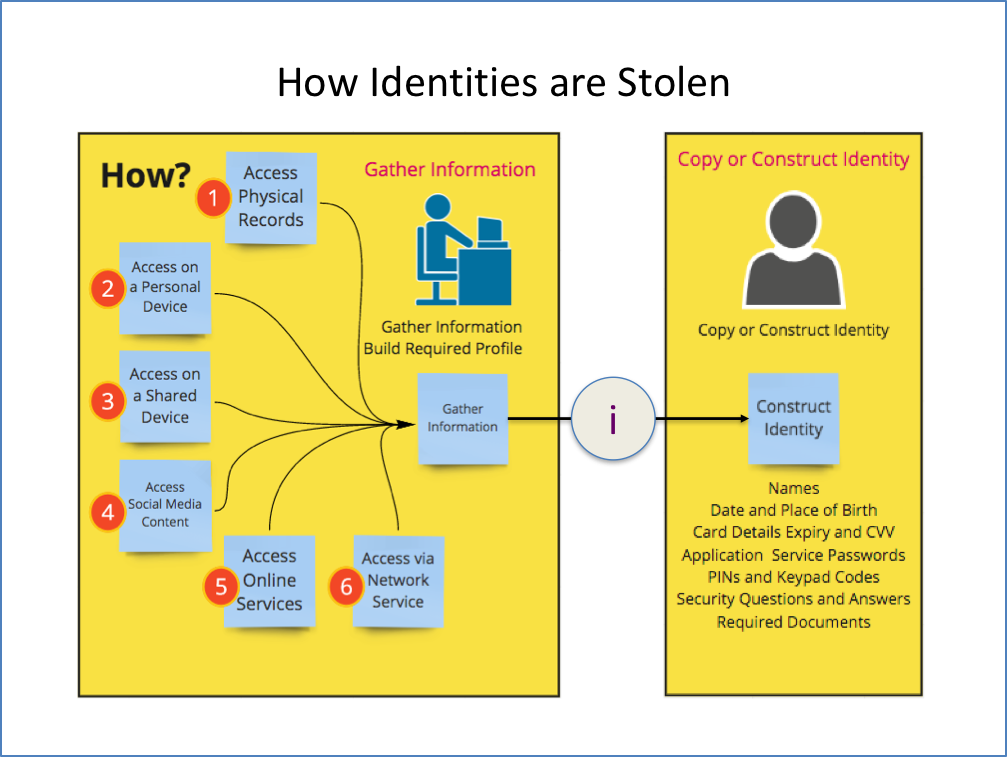
Information that may on its own not appear to be information that is valuable, when combined with other information can be used to build a personal profile. Knowing a person’s profile can help answer security questions, and facilitate someone acting as that person.

Where information is kept determines how it can be accessed. Different strategies may be followed to gain access to information that can assist in profile building and ultimately identity theft. Information is distributed. Some information is kept as a physical record, some as an online record and some as both.

Physical records

You probably have a number of physical documents that you perhaps keep at home. These could include:

  • Identity documents, Driver’s Licence, Passport
  • Bank cards
  • Social benefit cards
  • Educational qualifications
  • Bank statements
  • Account statements (retailers and utilities)
  • Medical records
  • Insurance Records
  • Contracts

Some of these records must be kept, others not. How do you protect them from damage or theft? How do you dispose of documents when you no longer need to keep them?

Information can be physically stolen by intercepting delivery, theft from your home, office, bag or vehicle, and even from waste disposal.

Information can be electronically stolen by using mobile phone cameras to capture documents that are left accessible. By photographing for example the two sides of your bank card, a person can use this information to shop online at your expense.

Focus in later sections will cover Bank Card usage, risks etc.

Personal devices

Personal devices include any mobile phones, tablets, laptops and computers that you use. These devices have your information on them. Do you secure the devices effectively?

Theft of a device may result in access to all your information on that device. If someone gets access to your device, can they access all your services?

Information can also be stolen from your device without stealing the device. When working on public networks or using Bluetooth services your device may be vulnerable to access by others.

Shared devices

Using devices that belong to others introduce some additional risks. Computers and other devices that belong to a friend or colleague, are located in computer lab, library or internet café are not under your control. When working on these devices you leave a trail of information that can be accessed by others. Are you diligently ensuring that no information trails are left behind, no services left logged in to?

Social media content

Social media services encourage us to share information freely. Tools allow you to easily share what you do, where you go, what you saw, who you were with, what you believe and what you care about. This information generally ends up in the public domain for all to see and do with what they please.

You are being followed by others and are encouraged to believe this is a good thing. Do you know who is following you? Do you know who all the members of your groups are?

Over time, you build up and share a profile of yourself for all to see. This assists those who wish to target you and steal your identity.

Online service content

Online storage is as good as free. Why invest in your own storage on your own systems when you can have it all online and get to it from anywhere, anytime? So can others if you are negligent. Are you sharing your online content with others, and if so is it being done securely? Plenty of services offer shared storage areas for collaborating in business or within social circles.

Network access to content

Mobile network service providers charge for data. Wi-Fi hotspots enable us to use data at no charge. What price are we paying? Public networks, may expose us to eavesdropping, where people we do not know intercept our communication and perhaps gain access to our devices while we use public networks to access services on the internet.

Bluetooth services allow you to share content with our friends. Are you controlling access to your mobile device effectively?

DIM-03-01 Why Steal an Identity

We indicated, earlier, that identities are the key to gaining access to services and resources. Anyone who can present themselves as us, and satisfy the persons or processes used to authenticate our identity, could get authorised access to our services and resources.

Let us consider some motivations a person presenting themselves as us could have.

Data harvesting

Knowledge facilitates impersonation. The more someone knows about you, the more they are able to appear as you. Gathering information about you, your family, your contacts, your interests, your activities, your movements, your commercial relationships, and your financial status is useful to someone with malicious intent. Your information, and the information of many others, is stored in databases online.

Data harvesting is the gathering of bulk data, perhaps simply usernames and email address or phone numbers, to build a base for further information gathering. You can be used as a springboard for gaining access to others and their information.

By gaining access to a device using the device identity and authenticator, all information on your device may be harvested.

By gaining access to your email identity, the information your email archives hold can be harvested. The impostor can now access all your online emails, read and access any information recorded in the emails including file attachments, bank statements, utility accounts, creditor statements, travel records and plans etc. This information may assist in providing clues relating to finding out identities used for your other online services.

Service entitlement

Online services that you have subscribed to, entitle you to certain benefits. These benefits may be related to entertainment services, government, educational, social, commercial or transport services. Use of these services by others appearing as you, may result in you having less or no service access.

Service profile changes

Hijacking of an online service can occur when someone, acting as you, changes your profile making it impossible for you to take control. The other person continues to use the service and you have no way of getting back control.

Cyber-Bullying

Also known as online bullying, cyber-bullying is any form of bullying behaviour or harassment that takes place using digital devices.

Bullying occurs when a person is repeatedly targeted using social media sites, and other online interaction and messaging services.

Stalking, repeatedly harassing and intimidating, and even excluding individuals from groups can be seen as cyber bullying. Cyber-bullying includes sending, posting or sharing mean, perhaps false, negative and potentially harmful content about others that leads to embarrassment or humiliation.

The impact of cyber bullying may be initiated online but extend to real-world social outcomes including peer pressure and social exclusion.

Common amongst teenagers and young adults, this behaviour can also be done anonymously.

Potentially, cyber-bullying can be considered as criminal if the behaviour is unlawful.

Reputational damage

Posing as you, and posting inappropriate information online on social media sites, can harm your reputation. This could damage your credibility and jeopardise your career, family or social environment.


Sending emails that look like they originated from your personal or business account can also do damage to you social and business relationships.

Financial impact

Using your identity to successfully access your financial services allows someone to transact on your behalf. Buying online, transferring funds, using credit services and doing credit purchases can harm you financially.

This could be achieved through the use of your bank cards, or cloned cards in the real world and your card information online, or accessing online banking services using your identity.

Scenarios that could result if someone took your identity:

  • Access your online banking services, change your profile, manipulate funds, transfer cash out of accounts etc.
  • Access your services at retailers where you have accounts. Purchase goods on your credit facility.


DIM-02-02 Authentication and Authorisation

How Secure is Your Identity?

Having a username and password may not be enough in terms of security. If someone knows your username and guesses your password, they can gain access to your services and the service provider will think it is you.

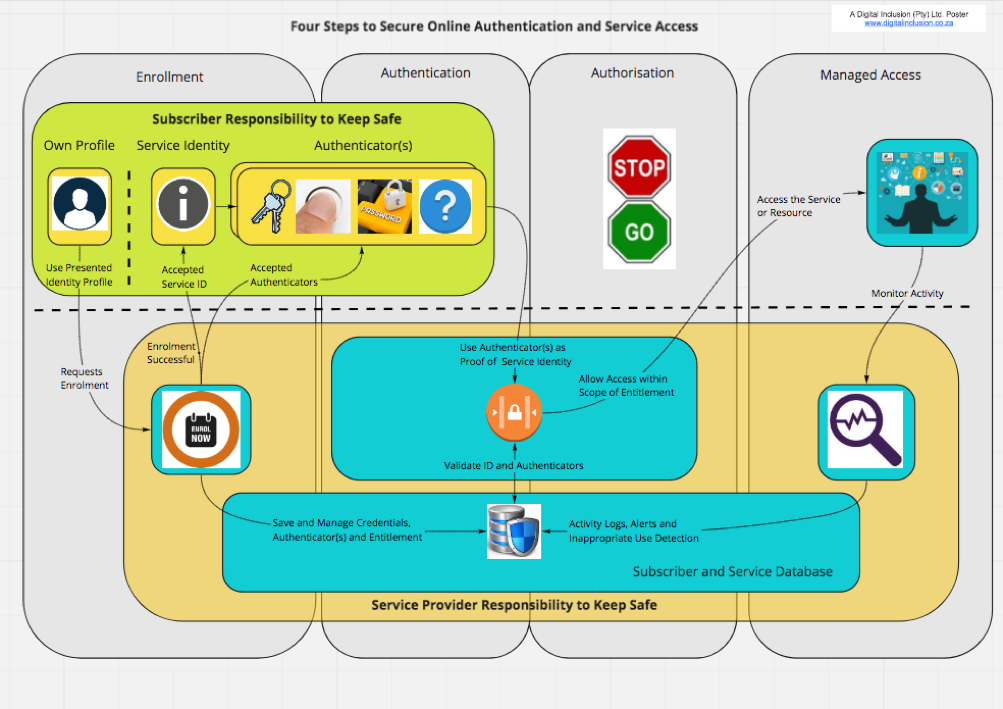
Service providers use authentication to establish that users are who they claim to be before given you authorised access to their services.

Managing your Identity

This process of establishing and verifying your identity normally has three key steps:

  • Enrolment – users apply to become service consumers. After proving their identity to the service provider, the service providers allow the applicant to be registered as a subscriber.
  • Authentication and Authorisation – after subscribing, the user receives some force of identity and authenticator(s) (username and password, a token etc.). Using the provided evidence of identity, the user requests access, is authenticated and can benefit from service access
  • Identity Maintenance – the service provider maintains the user credentials and the user maintains his authenticator(s).

Authentication Methods

There are various types, or methods of authentication (https://en.wikipedia.org/wiki/Authentication), (Accessed 4 June 2018):

  • Authentication is accepting proof of identity given by a credible person who has first-hand evidence the identity is genuine. In information technology scenarios, an example of this is the where centralised authority trust relationships back most secure internet communication through known public certificate authorities
  • Authentication is based on comparing the attributes of the object itself to what is known about objects of that origin. Not typically associated with information technology scenarios
  • Authentication relies on documentation or other external affirmations. In information technology scenarios, a user can gain access based on user credentials that imply authenticity. An administrator gives a user a username and password, or a card or other device to allow system access. Authenticity is implied, not guaranteed.

Digital authentication Risks

Authentication in a digital scenario is vulnerable to man in the middle attacks where a third party intercepts transmission of information and poses as the other parties to gather information. This leads to the need for higher security digital authentication.

Authentication factors and identity

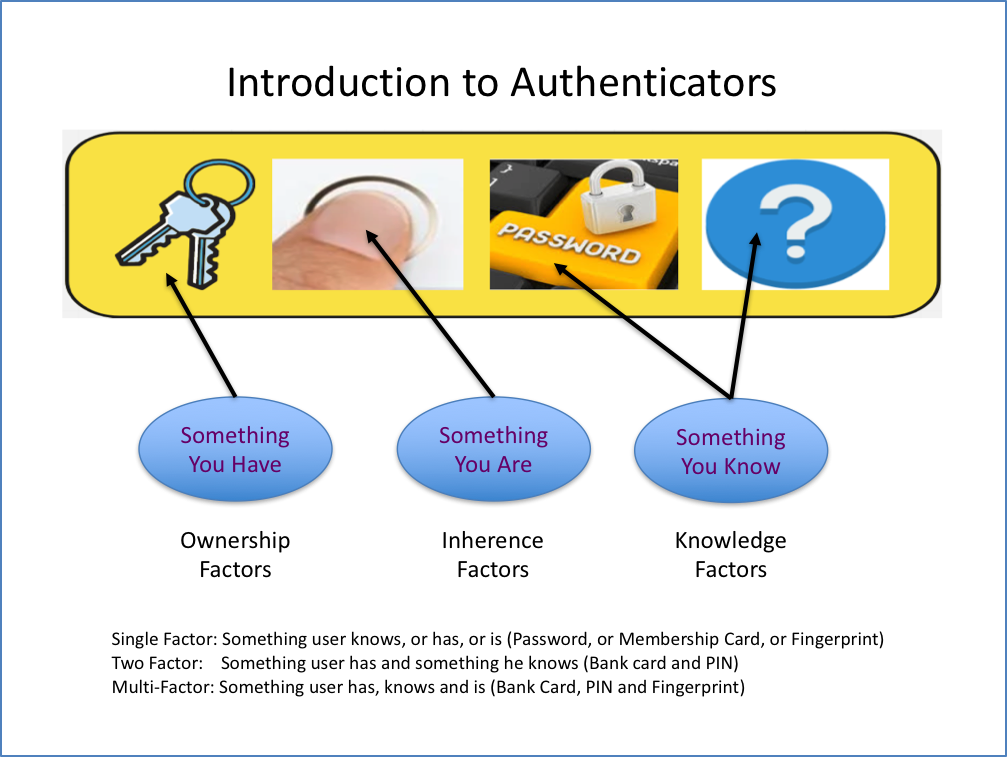
There are three categories associated with how we authenticate:

  • Something the user knows – Knowledge factors (password, personal identification number (PIN), security question etc.)
  • Something the user has – Ownership factors (cell phone, wrist band, ID or membership card)
  • Something the use is – Inherence factors (biometrics – fingerprint, iris pattern, facial recognition)

Digital authentication types

Common types of online authentication are based on the level of authentication protection required.

Single-factor authentication – this is the weakest, relies on only one of the factors. Not suitable for financial or personally relevant transactions. Examples would include:

  • Password (something the user knows).
  • PIN (Personal Identification Numbers) – normally a fixed, personal, sequence of digits. Typically used in conjunction with bank cards when using a card payment terminal, an ATM or an application on a computer
  • Biometrics – the use of a fingerprint, facial recognition, voice recognition etc. More secure than a password or PIN as it depends on physical or biological characteristics of the individual. Used commonly on Smartphones to open device when locked.

Two-factor authentication – this is stronger as it relies on two factors. To improve security when single factor is not enough, there are a number of authentication methods that service providers can use. Once a user has attempted to gain access to a service by providing the username and password, the service provider can request additional information. This is done by sending a request for further information to a device known to the user. Two factor authentication is common for financial application services, banking applications etc. Two factor authentication methods are also used when someone attempts to change registered account information to ensure that the account settings can only be changed by the registered user.

Examples would include:

  • Use of bank card (something the user has) and PIN (something the user knows)
  • OTP (One time PINs) – if the user is logging in to an application, the application may send a one-time code via an SMS to a registered mobile phone or to a registered email address. Security is based on the assumption that if the person logging in has the registered mobile phone or is accessing the registered email, then the person must be the registered user.
  • Security Questions – if the user is logging in to an application, the application may include the challenge-response approach where the user has to answer a security question. Security questions and answers will have been setup and recorded during subscriber enrolment. To increase security, the question asked can be randomly selected from a bank of questions. This approach is sometimes combined with other factors for sensitive or high risk transactions., for which the answers were predefined by the registered user, to determine if the person logging in is actually the authorised user. This approach is sometimes combined with other factors for sensitive or high risk transactions.

Multi-factor authentication – Use more than two factors to enhance protection. Example may be:

  • Requesting to change a PIN may require bank card (something the user has), old pin (something the user knows), as well as perhaps fingerprint (something the user is)


Service providers decide on the level of authentication they require when authenticating your identity. High risk financial transaction services demand high levels of security when authenticating. Subscription services for accessing the latest news may require only basic authentication as the risks are low.

DIM-02-01 Identity Management Introduction

Who are we?

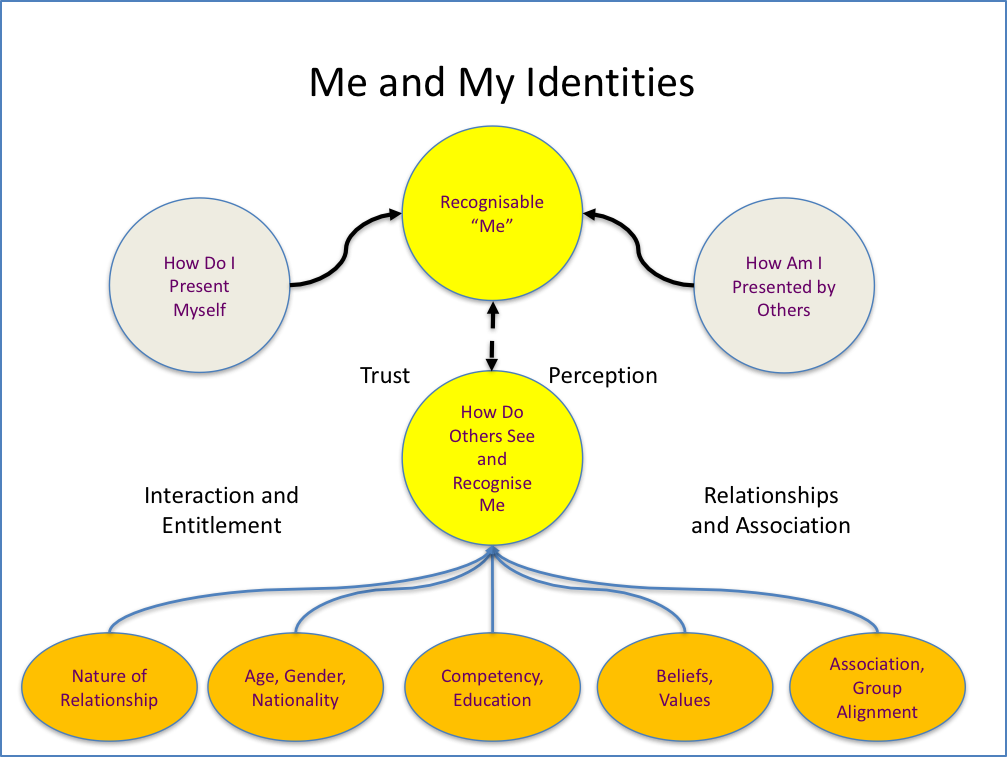
How do we identify ourselves? How do we present ourselves to others? How do others recognise us, and identify us? Do you have multiple forms of identity?

Why do we have an identity?

We need to be known, and identifiable, if we are to benefit from accessing services. Service providers, in both the real world and the online world, need to ensure that services we are entitled to are not given to others. Our identity, and the ability to prove our identity is the key to gaining access to services.

How are identities used?

In principle, we gain access to services and information based on our our identities. This involves a four step process:

  • Presentation of our identity – We present our identities when wanting to gain access to services or information
  • Authentication of our identity – The service provides checks our identities against know records to see if they are authentic (valid) and they are comfortable that we are who we claim to be.
  • Authorisation of our right to access – Once satisfied with the authenticity of our identity, the service provider authorises our access.
  • Access to services and information – We are now free to access the services and information we wanted.

Real, physical world identities

As citizens, we should have been registered at birth. Our government opens and maintain a record for each individual, and each individual is given an identity. This is managed and regulated by a specific government department (Home Affairs in South Africa). Proof of your identity could be through the presentation of:

  • Birth Certificate – Proof of the individual’s registration as a citizen.
  • Identity document or card – official document with personal information and photograph. Issued to citizens.
  • Passport – official document with personal information and photograph. Used to allow individual to travel internationally.
  • Driver licence – linked to identity record, with a photograph. Official document detailing individuals right to drive and operate certain types of vehicles.

Outside of official government issued identity related documents, alternative documents or tokens can be presented to gain access to specific services and resources:

  • Membership Card – Club, society or professional association identity with name, membership number etc. Entitles the member to use club or society services and resources.
  • Student Card – Education institution association with name, student number, photograph etc. Enables student to gain entry to facilities and access institutional and other campus services and resources.

All of the above forms of identity proof, are physical and normally presented by the individual on demand. The person or system that authenticates the identity can visually compare photographs, signatures etc., and can make a call to authorise access to services or resources for the individual.

Online, digital identities

In the online world, we use digital identities. Each service we wish to access and use online has their own requirements for identifying and authenticating users. Users choose to subscribe to services and engage with the service provider to establish an acceptable form of identification and a means to verify that the individual who uses that identity online is in fact the person who they claim to be.


Examples of services and identities include:


  • Username and password to gain access to a device
  • Username and password to gain access to an online application service
  • Username and a personal identification number (Fixed PIN or one-time pin OTP)
  • Bank card number and PIN – normally processed digitally to scan the card and then challenge the presenter to enter something known only to themselves (a Personal Identification Number or PIN). Having the card physically and knowing the information requested is taken as implied proof of identity. If processed manually, additionally information may be asked for.

So, if you use email, Facebook, WhatsApp, Dropbox, and perhaps Google services, you already have multiple identities online. Some identities may be linked to a known mobile phone number, others to a username that you or a service provider chose. Each service may have its own password or alternative approach to verifying you are who you claim to be. Anyone who pass the authentication test is assumed to be you.

Setting up an Identity

  • Register with a service provider to be entitled to benefit from their services. Setup a unique identity as required by the service provider.
  • Once registered, present proof of your unique identity to be authorised to gain access to services.

Our National Identity

There are a l lot of people on this planet. Each of us presents ourselves to the world and establishes relationships with others. We become known. Our name, given or registered, may identity us within a known circle. But our name may not be unique. Wherever we associated in a business, community, club, educational institution, or professional association, we need to be able to prove our identity to be authorised to gain access to  the benefits of our association.

  • As a citizen of a country we have certain rights (and responsibilities). Our rights may includes access to basic services, healthcare, schooling, social benefits, and the right to vote etc. Our responsibilities may include contributing back to society in the form of paying taxes, military service etc.
  • In order to secure access to our rights as a citizen, we are registered, typically at birth, given a unique identifier (identity number) and our name, parents information etc., are recorded in the national population register. Our unique identity is used by all government services as the index for information related to us. This can includes voting records, birth and death certification, criminal records, health records, tax records, etc. To prove we are who we are, we are issued with a proof of identity document or card by our national home affairs department.

Physical World Identities

As discussed above we need to prove our identity in the physical world. We may have multiple identities each with their own approach to proving we are who we claim to be. Most forms of identity proof have a photograph, signature and a link to our national identity to allow for validation of identity.

  • National Identity Document / Card – Identity document used as proof of citizenship.  This is the primary proof of our identity as an individual and may be referenced on all other identity forms.
  • Passport – Has own document number but is linked to our national identity. Sometimes a passport  may be accepted as proof of identity.
  • Driver’s Licence – Evidence of our competency and right to drive a vehicle. Linked to national identity. May sometimes be accepted as proof of identity
  • Club or Professional Association Member Card – ensures access to club services. Membership number unique, may be linked to national identity
  • Student Cards – Unique student number, may be linked to national identity number.

Digital World Identities

Online, we establish multiple identities. When subscribing to digital services online, we register with the service provider, open an ‘account’ whether commercial or not, and provide information by which we can be recognised. There are two key considerations for setting up an account:

  • We must have a service ‘username’ which must be unique as far as the service provider is concerned.
  • We must be able to prove we are the right person accessing the service by setting up a secret ‘password’ that must be offered in association with the unique username. 

The ‘username’ may be given to us by the service provider, or we may be able to define our own username as long as it is a unique username in the service provider’s records.

Authentication and Authorisation

Essentially each service provider maintains a record of authorised or registered users and a unique method to verify their identity. Each time a user attempts to access their service they must present their credentials, normally a username and secret password which is checked against the service provider’s records. When successful, a user is authorised to use the services and granted access.

If we have an email account as our username, the email address must be unique, and only be used by ourselves. As a result of this, we could use the email address as a username for other systems as well.


DIM-01-02 Privacy Rights and Responsibilities

Privacy, Rights and Responsibilities

In a world where technology innovation happens faster that the laws that govern the use of technology, we are exposed to potential uses of technology that are not well governed. In particular, our information that we consider private or confidential, may be accessed, shared, and used in ways we would not want.

What is Personal Privacy

There is no one definition of privacy and in particular what should be private or public.

Privacy can perhaps be defined as a state, free from public attention, in which one is not observed or disturbed by others. In some parts of the world, privacy is defined as the right to be left alone, or freedom from interference or intrusion.

Information privacy is the right to have some control over how your personal information is collected and used.

There are many aspects relating to privacy and they differ across cultures based on cultural sensitivities, and a sense of dignity.

As we embrace digital technologies and services, the risk of unintentional or malicious access to information increases.

  • Physical Privacy –  preventing others from intruding into your physical space – this could be protection of modesty by wearing clothes, building walls, fences, partitions and keeping a certain distance. Preventing access to your home or car, preventing searches or taking of pictures and videos. Safekeeping and prevention of access to computers that are the window into the internet and associated online services.
  • Information Privacy – This is related to concern about how uniquely identifiable data relating to individuals is collected, stored, analysed and shared. The ownership of the information is also a concern. This information is typically used for individual to gain access to online services and protection of this is crucial.
  • Financial Privacy – Bank accounts and transaction records. This information must be protected and efforts made to eliminate risk of fraud and identity theft
  • Internet Privacy – What one shares or choose not to share. Email content, web activity history etc. Concern over who collects information and what they do with it.

Resource: https://en.wikipedia.org/wiki/Privacy (Accessed 23 May 2018)

Privacy and the Law

Living in a society, real or digital, means we should conform with the laws, values, norms and ethics in that society. We need to respects the rights of others in the society as we would like our rights to be respected.

Laws are evolving to deal with the digital world. By way of example, in South Africa we have seen the introduction of:

  • POPI – The Protection of Personal Information Act
  • Drone Laws – South Africa leads the world in terms of drone regulations

Where laws do not exist to protect us, we need to rely on moral and ethical behaviour as our guideline. Consider the following as basic examples that raise issues concerning privacy and information rights:

  • Can we photograph other peoples children and use them as we see fit
  • Can we follow people and record their information, habits and activities and share that information with others
  • Do we have the right to record conversations without permission
  • Can we fly drones wherever we choose and record videos
  • Can we copy documents and web content that belongs to others and use it for our purposes
  • Who can access customer information at banks, retailers, insurers and other consumer service companies.
  • Who has a right to know how much we earn, where we live and work, what accounts we have.
  • Who has a right to know our medical history, or even our criminal history.

So, we really need to decide what we consider private, and what can be in the public domain. We need to manage our own sharing of information as best we can.

DIM-01-01 Our Digital World

Living in a Digital World

Worlds within worlds. What do we mean when we talk of a digital world? More correctly we should be talking about what has happened to the world as we knew it before the introduction of information and communication technology (ICT).

What is information and communication technology

ICT includes all technology and services based on technology including computer networks, the internet, the world-wide-web, computers, smartphones, modern switchboards, video conferencing systems, computer applications. Storage disks, memory sticks, and even modern television etc.

Today, ICT is called digital technology. This is because all information captured, stored and transferred using ICT is converted into a digital representation. What that means is we use two states, or two conditions to represent information. This is also called binary representation, where a signal or state is either on or off.

In short, ICT today takes what we do and it converts it into digital formats that enable information to be captured, stored, moved, copied and shared easily. ICT developments have as a result made it possible to deal more efficiently and accurately with more and more information. This has made a positive impact in many scenarios, but as with all change, risks and negative consequences have been introduced.

We are all online as digital citizens

Whether you are consciously working online or not, you are online and you exist in a digital world.

Your records are saved in government and private sector systems. Information relating to your family, your birth records, marital records, bank accounts, education records, travel, immigration property ownership, social activity records, voting records, medical records, and social service entitlement etc. are all online. This information is analysed, interpreted, and shared using computers, databases, networks and applications by various parties.

Even if you are not actively using computers you are a digital citizen. What we say and do using these services is a reflection of our habits and preferences. How we represent ourselves is a portrayal of our online or digital identity.We are now all active in a digital world. We have no choice.

Wherever we go, we complete attendance or visitor registers, have our photographs taken and personal information recorded. Surveillance cameras record our movements. Our signatures, identity documents, drivers licences, access cards, store cards, loyalty cards and bank cards are constantly being digitally scanned.

Government agencies, as well as the companies we buy from, or work for, use digital systems, digital services and networks. Our information and activities are captured, stored and shared on digital systems, and our information moves about over digital networks.

Sometimes we have knowledge of our information being captured and recorded, sometimes we do not. Some example scenarios are discussed below.

Using bank cards at ATMs and merchants

As an example: You may not own a smartphone, or a computer. You may not use Internet cafes or other people’s computers. But you do have a bank account and the bank has given you a bank card. You go to ATMs to deposit and draw cash and you buy from shops or merchants using your card.

When you use your card at an ATM, the ATM reads the information on your card, combines that information and checks your PIN that was requested, and then authorises you to continue. The ATM is a computer. The information you type is in recorded, transferred over networks to other computers and via a number of network devices so that the bank can authorise your transaction and keep record of what you do. Your information and activity is digital even though you just pushed in a card and entered some numbers on a keypad.

Instant messaging and social networks

WhatsApp has changed the world of instant messaging. Every message we receive and send is captured on a phone (or computer), transferred to WhatsApp’s computers over networks, and sent to the person the message was intended for. WhatsApp, and other know when you are available, when last you were available, which of your contacts are available and saves all your chats before delivering them.

Without thinking about it, we use social media services that add a lot of value in terms of how we communicate and interact. Everything we do using these services is captured and remembered, analysed and acted upon.

Utility applications on Smartphones

Our smartphones provide us with great utility. We take photographs without the need for a real camera, and we use application to find information, and even give us direction to find places.

Consider first the camera. Every time a modern camera takes a picture, it records additional information about the photo. What camera settings were used, and even where and when the picture was taken are recorded. When a photo is saved or shared this information goes with it. Others who access these photos, whether as Facebook, Instagram or WhatsApp posts, attachments in emails, or using any other computer or smartphone application can know where you have been and when. Your activities are online. Add to this the fact that facial recognition can identify you in pictures taking by others, you are not in control of this.

Consider map applications. Map applications must know where you are when helping you navigate. Obviously your position is known and used to indicate best routes to follow and to help avoid traffic congestion. How do these apps know what the traffic congestion is. All users of the app are contributing, perhaps without knowing, where they are, what speed they may be travelling, and this information is used to assist in presenting status of traffic flows. The history of where you are, and where you have been, are recorded, stored, analysed and acted upon.

Consider applications that personalise your experience by remembering what you like and do to give you a better user experience. All these application use techniques to make it easy for you to login, go where you normally go, show you who you last called or messaged, sort your information the way you like etc. This is done by keeping track of your habits and choices and learning more and more about you.

Working at internet cafes

Consider strolling into an Internet Café and using one of their computers. You browse the internet using a web browser on the system. You go to sites, look for information, check your email, go to social media etc.

When you walk out, the system you were working out knows where you have been, what sites you have visited. You have left a trail of breadcrumbs that is on record. Even though the computer was not yours, you are identified by the actions you took.

Whatever applications exist on the systems at the internet café they are at liberty to monitor and record what they choose.

Using another person’s computer

If worried about internet cafes, perhaps you choose to use a friend’s computer. You run similar risks unless you are assured there are no viruses or malicious software agents, key loggers etc. on the system and you understand how to navigate the internet securely.

Benefits of being a Digital Citizen

There are many benefits of being a digital citizen, some of these include:

  • Banks can better serve us by placing ATMs in convenient locations for our use.  We simply walk up and present our identity, a bank card.
  • We use instant messaging, email and social media services to enhance the relationships we have with those we care about, by sharing messages, photographs and videos.
  • We can find out anything we need to know instantly by searching on the internet for information and even videos.
  • We can store and manage all our personal information and important records online and not worry about the risks of loss or theft of a computer or mobile device.
  • We can use online services to manage our personal and business lives.
  • Companies we buy from from and government agencies can provide us with better service, even personalised service by doing so online.

Risks of being a Digital Citizen

There are some risks of being a digital citizen, some of these include:

  • We can be targeted and flooded by digital communication and advertising as our digital identities becomes widely known.
  • Personal and confidential information of ours and about us is stored online. Access to this information is protected through the use of a Digital Identity that represents us. It is possible that this information ends up in the wrong hands and exposes us to risks if not adequately secured.
  • We have personal access to services online. People can steal our digital identities, pretend to be us and gain access to our personal services, or get access to new services using our identities.
  • People using our identities may conduct activities that damage our real-worlds and digital world reputations.

Choices in a Digital World

We choose to use services.. By doing so, we expose ourselves to risk. The benefits of the service may, in our view, outweigh the risks. We make a call to trust the service providers, the systems, and the networks we use to gain access to the services.

We have some control regarding security, we need to understand what is in our control and what is not in our control.