DIM-02-02 Authentication and Authorisation
How Secure is Your Identity?
Having a username and password may not be enough in terms of security. If someone knows your username and guesses your password, they can gain access to your services and the service provider will think it is you.
Service providers use authentication to establish that users are who they claim to be before given you authorised access to their services.
Managing your Identity
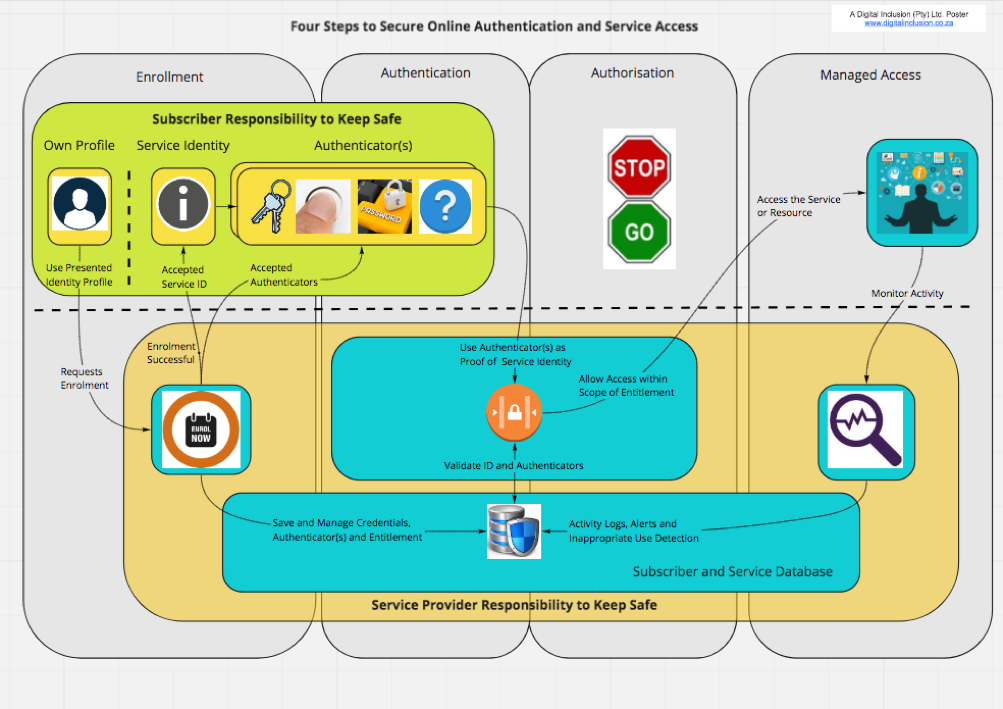
This process of establishing and verifying your identity normally has three key steps:
- Enrolment – users apply to become service consumers. After proving their identity to the service provider, the service providers allow the applicant to be registered as a subscriber.
- Authentication and Authorisation – after subscribing, the user receives some force of identity and authenticator(s) (username and password, a token etc.). Using the provided evidence of identity, the user requests access, is authenticated and can benefit from service access
- Identity Maintenance – the service provider maintains the user credentials and the user maintains his authenticator(s).
Authentication Methods
There are various types, or methods of authentication (https://en.wikipedia.org/wiki/Authentication), (Accessed 4 June 2018):
- Authentication is accepting proof of identity given by a credible person who has first-hand evidence the identity is genuine. In information technology scenarios, an example of this is the where centralised authority trust relationships back most secure internet communication through known public certificate authorities
- Authentication is based on comparing the attributes of the object itself to what is known about objects of that origin. Not typically associated with information technology scenarios
- Authentication relies on documentation or other external affirmations. In information technology scenarios, a user can gain access based on user credentials that imply authenticity. An administrator gives a user a username and password, or a card or other device to allow system access. Authenticity is implied, not guaranteed.
Digital authentication Risks
Authentication in a digital scenario is vulnerable to man in the middle attacks where a third party intercepts transmission of information and poses as the other parties to gather information. This leads to the need for higher security digital authentication.
Authentication factors and identity
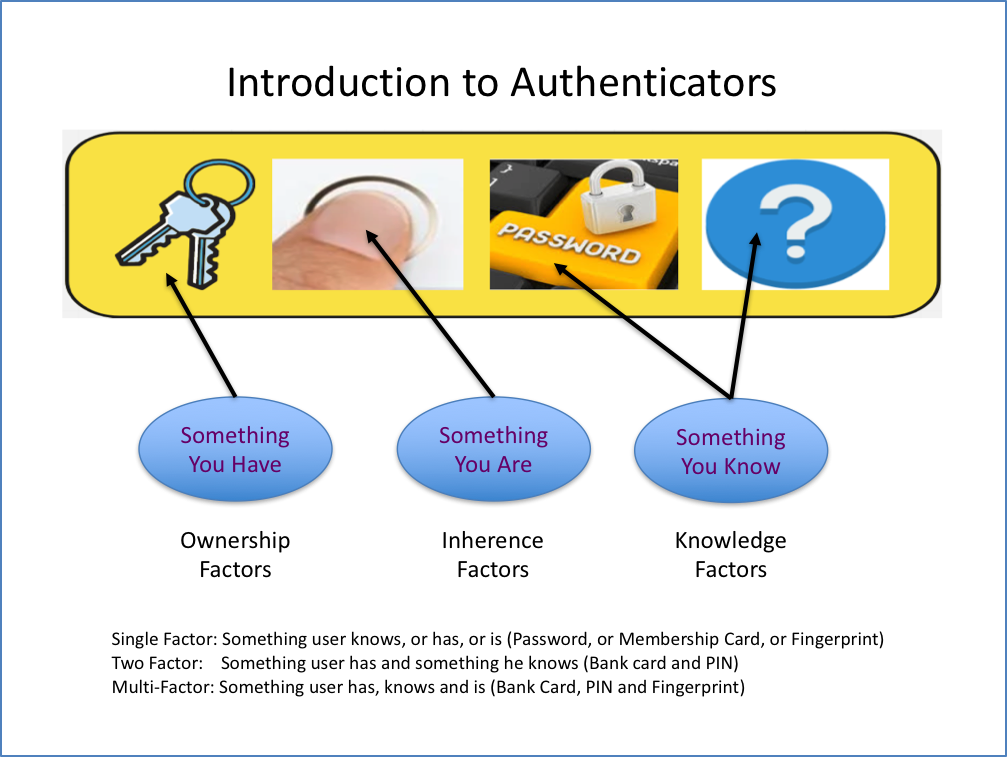
There are three categories associated with how we authenticate:
- Something the user knows – Knowledge factors (password, personal identification number (PIN), security question etc.)
- Something the user has – Ownership factors (cell phone, wrist band, ID or membership card)
- Something the use is – Inherence factors (biometrics – fingerprint, iris pattern, facial recognition)
Digital authentication types
Common types of online authentication are based on the level of authentication protection required.
Single-factor authentication – this is the weakest, relies on only one of the factors. Not suitable for financial or personally relevant transactions. Examples would include:
- Password (something the user knows).
- PIN (Personal Identification Numbers) – normally a fixed, personal, sequence of digits. Typically used in conjunction with bank cards when using a card payment terminal, an ATM or an application on a computer
- Biometrics – the use of a fingerprint, facial recognition, voice recognition etc. More secure than a password or PIN as it depends on physical or biological characteristics of the individual. Used commonly on Smartphones to open device when locked.
Two-factor authentication – this is stronger as it relies on two factors. To improve security when single factor is not enough, there are a number of authentication methods that service providers can use. Once a user has attempted to gain access to a service by providing the username and password, the service provider can request additional information. This is done by sending a request for further information to a device known to the user. Two factor authentication is common for financial application services, banking applications etc. Two factor authentication methods are also used when someone attempts to change registered account information to ensure that the account settings can only be changed by the registered user.
Examples would include:
- Use of bank card (something the user has) and PIN (something the user knows)
- OTP (One time PINs) – if the user is logging in to an application, the application may send a one-time code via an SMS to a registered mobile phone or to a registered email address. Security is based on the assumption that if the person logging in has the registered mobile phone or is accessing the registered email, then the person must be the registered user.
- Security Questions – if the user is logging in to an application, the application may include the challenge-response approach where the user has to answer a security question. Security questions and answers will have been setup and recorded during subscriber enrolment. To increase security, the question asked can be randomly selected from a bank of questions. This approach is sometimes combined with other factors for sensitive or high risk transactions., for which the answers were predefined by the registered user, to determine if the person logging in is actually the authorised user. This approach is sometimes combined with other factors for sensitive or high risk transactions.
Multi-factor authentication – Use more than two factors to enhance protection. Example may be:
- Requesting to change a PIN may require bank card (something the user has), old pin (something the user knows), as well as perhaps fingerprint (something the user is)
Service providers decide on the level of authentication they require when authenticating your identity. High risk financial transaction services demand high levels of security when authenticating. Subscription services for accessing the latest news may require only basic authentication as the risks are low.