DIM-04-02 Online Use of Bank Card Information

Online commerce has grown to be larger in value than in-store commerce in certain markets. The convenience of online shopping and trading is a core competitive advantage for merchants and popular with consumers.

Shopping online

To purchase online using a debit or credit card, you are expected to have the information that relates to the card account. Some service offer to capture and store the details for your convenience, allowing to shop without having to enter card details for each transaction (this is discouraged).

When doing online transactions, the physical presence of a card is not required. Information, as contained on the card is. This information is typically the card number, account holder name, expiry data and the CVV. All of this information could be provided if known, without needing to have a card present.

Depending on the service being used, different levels of authentication may be required before authorising access to the service.

Internet Banking

This is not really directly related to you bank card. To do online banking you access your bank account directly and authenticate yourself directly with you accepted bank credentials and authenticators.

DIM-09-03 Information Risk Prevention

Information risk Prevention

There are a number of ways you can mitigate or minimise the risks of information exposure.

What should I share

Perhaps the best place to start is to think about what you should and should not be sharing. If you have given this enough thought, you will be more aware of the risks you face when going about your everyday online activities.

Who should I share information with

Consider who you should share information with. You have different ‘disclosure boundaries’ depending on who you are interacting with. You will share different information with your wife, your boss, the shopkeeper, and strangers you engage with when commuting.

Have a clear picture of what you are prepared to share in each of the scenarios and online environments you are engaging in.

Managing Location Tracking

On your devices, PC and mobile, take charge of the exposure of your location information. Only enable location tracking for applications that you trust, and applications that are location dependent (maps while navigating). Why allow application tracking for general applications (web-browsers, social media services, your camera etc.)

A photograph that you share on WhatsApp or Facebook will contain information about where you were, on which day and at what time the picture was taken unless you disable location tracking on your camera devices (smartphone etc.) With facial recognition services being integrated into online service applications, you may not even be aware that the people in your photographs are now able to be recognised and tracked, and you are responsible for having enabled this.

Sharing Financial Information

No banking services should ever ask you to share for you banking details online or over the phone. Your password, and PINs should only ever be known by you. Emails and phone calls that ask for this information are likely to be from other parties, and not the bank.

Perhaps consider requests made for this information online as similar to how you would handle such an enquiry if a stranger met you in the street and ask for the information. How do you know who the person requesting the information is, and whether it makes sense to give them the information? As a general guide, do not share information unless you initiated the conversation and you have assured yourself the person you are dealing with is the right person to engage with.

If anything looks suspicious, ignore it, delete it, do not respond or enter into discussions or interactions. If any financial institution really wants to get hold of you, they have your details. Your job is to ensure your records are up to date. You are in control of your authenticators (passwords and PINs, email address, phone number etc. Keep your profiles up to date yourself.)

Guidelines for risk management

Managing online profiles

If any online service provider really wants to get hold of you, they have your details. Your details are in your profiles. Your job is to ensure your records are up to date. You are in control of your online profiles and authenticators (passwords and PINs, email address, phone number etc.). Keep your profiles up to date yourself.

Make sure you have a good password and PIN strategy. See the section on Password risk Management.

Identifying ‘phishing’ and malicious activities

We receive high volumes of emails and messages. Inherently we would like to trust everyone who contacts us and engages with us. Unfortunately, the digital world has enabled access to us by those we do not know and are often unable to verify their identities.

Look out for emails and messages that are suspicious. If information is being requested from you, be alert and ask if this is a normal request that can fairly be expected. If you have not initiated the conversation, and it comes as a surprise, be very cautious.

Phishing emails look authentic. The email name address appears to be ok, but if you check closely the underlying email address will likely look odd, or have one or characters that do not match the institution represented. In many cases the person with malicious intent has even copied images, screen layouts, web page layouts etc. that are nearly identical to the organisation they are claiming to representing.

If anything looks suspicious, ignore it, delete it, do not respond or enter into discussions or interactions. If any online service provider really wants to get hold of you, they have your details. Your job is to ensure your records are up to date. You are in control of your authenticators (passwords and PINs, email address, phone number etc. Keep your profiles up to date yourself.)
DIM-09-02 What Information is At Risk

What information is at risk

Information targeted includes information about you, and indirectly through you, information on others that you interact with.

Information about you

Any information that may assist in better profiling you is gathered by persons wishing to exploit you. Learning more about you enables another person to better emulate you, and even replicate your authenticators through analysis, guesswork and deduction. Working out your passwords, answers to security questions, and information relating to your family, friends, associates and interests.

Where you go, where you shop or work may be tracked through monitoring and analysis of location data. What you post about yourself, or share in your online profiles, provides information threads to follow.

Information you have about others

You can act as a stepping stone, by providing information that gives access to a broader, targetable user base for exploitation purposes.

You have information, phone numbers, email addresses, home addresses, photographs and other information on people in your contacts database, as friends on social media services etc. Granting access or accidentally allowing access to your records is not fair to those whose information you have. Did they give you permission to share their information with others? How would you feel if your information is being shared without your permission?

By having your location and activity information in the public domain, you are at risk of sharing information, not only about yourself, but also information about those you engage with. People who have common interests, were mentioned or photographed as being in the same location as yourself. People referenced in your workplace or have links to your business, or professional history may be exposed. How do you feel if photographs or information about you are in the public domain, being shared without your permission or knowledge?

DIM-09-01 Online Information Gathering Strategies

Online Information gathering strategies

There are numerous ways in which online information can be gathered. Some of these strategies focus on:

Privacy in exchange for function and services

We want the benefits of using a service, so we may give permission to access our information. In reality, we are often responsible for our information getting into the public domain. We give away our privacy in exchange for use of social media services and other common applications and utilities (email, maps, search engines etc.).

In some cases, we may use a ‘suite’ of application services from one application provider. When we accept terms and condition of use, for example those of Google or Facebook, we grant permission to access and use our information as they see fit for providing us with ‘a better service’. This may mean they can track our location information, contacts, friends, interests etc.

Phishing

Requesting information from us, while posing as a person who we may consider entitled to request such information. In an email, or message, pose as a representative of a retailer, bank or other institution and request confirmation of account numbers, passwords, PINs etc.

Active Content Risks

Web-browsers can have active code (Cookies that are active for a single session or persistent after a session, scripts etc.) that execute on your device. This code can track keystrokes, activity, interests and pass the information back to another device on the internet. In some cases the active content could even extract data from databases on your device (contacts, other files).

Application Usage Risks

We are not always aware of how the applications we use actually work. We ‘trust’ application developers to be well intentioned and respectful of ourselves as users of their software. In particular, where we use free applications, we should reflect on why the applications are free. Are these application perhaps gathering information without our knowledge?

DIM-07-01 Service Provider Risks and Prevention

Service Provider Data Breaches

We subscribe to many services online. For each of these services we have an identity, and authenticator(s) to prove our identity when accessing the services. Each of these service providers stores our information to enable them to check we are who we claim to be when authenticating.

How secure are the service provider records? What is someone gained access to the service provider records for hundreds, thousands, or even millions of subscribers?

Service provider systems can be accessed over the internet and may be vulnerable to attacks aimed at gathering information or disrupting services. This would be considered a data breach. Service providers must ensure our records are safe and eliminate the risk of data breaches. Even if the information leaked or accessed during a breach does not include your password, other information about you could be used to build a view of your personal profile and put you at risk.

Even if information is encrypted during transfer from your device to the service provider, and your information is encrypted in their storage, you may still be at risk as a result of your service providers’ policies.

Service provider policy risks

What are the policies of your service providers with respect to sharing your information with other parties?

Each service provider has terms and conditions of privacy. When you subscribe to a service, and accept the terms and conditions, you may be giving the service provider permission to use your information.

Most service providers’ terms and conditions allow them to use and share your information within their organisation, group of companies, and even with other outside parties as they deem necessary to optimise their services to you.

The service providers may also change the terms and conditions without consulting subscribers.

Service provider data risks prevention

To minimise the risk of service provider data breaches, you should be aware of the level of data security your service providers offer:

  • Ensure all services you use are supporting encrypted transfer of passwords (https://…)
  • Ensure all services providers encrypt your stored information on their systems and do not keep your information ‘in the clear’.

Service provider policy risks prevention

To minimise service provider policy risks, specifically the disclosing or sharing of your information with others:

  • Read and understand your service providers’ terms and conditions
  • Familiarise yourself with the control the service provider gives you in terms of what information of yours can be shared
  • Apply privacy controls that are available to you to restrict what you share, and what the service provider can do with your information
  • Assess the risks and decide if using the service is worth the risk

DIM-08-02 Data in Transit Risks and Prevention

Data in transit risks and prevention

When accessing application services over the internet, you receive information from, and you send information to the service application. This information can be transferred ‘in the clear’ or ‘encrypted’ depending on the service providers site security.

As with access to stored data, any data flowing across networks can be intercepted by others. If intercepted, it is important to know whether the data is encrypted and safe, or whether it can be interpreted by others.

For example, when accessing web-sites, it is possible to see whether your information will be encrypted in transit from your workstation to the web server. If the site is supporting encryption, the web address (URL) will be https:// followed by the web server details. A site that does not encrypt data in transit will be http:// without the ‘s’ for secure.

If you are entering personal and confidential information on a web-site, always make sure it is secure. If not, your information can be intercepted.

DIM-08-01 Data Storage Risks and Prevention

Data storage risks and prevention

Wherever data is stored, it is at risk of unauthorised access. This includes data on your devices, and devices at any of your service provider processing points (in stores, distribution centres, payment processing centres, central operations etc.).

How is the data stored? How is it protected?

Data on your devices

All our devices offer us the chance to store our data as local content. The data may be stored in an application specific format, accessible only through the particular application. Data may also be stored in standard formats that can be read by many applications, or as readable text.

Examples of data stored locally includes out personal profile data, our contacts, calendar, notes, messaging records, email records etc.

Should we lose our devices, or should our devices be accessed by other parties, the data may be accessible and result in private and confidential information falling into the wrong hands.

Managing our devices is our responsibility. We need to protect our data from being accessed by others. There are a number of ways in which we can manage this:

  • Always use a device specific login name / PIN code to lock and prevent casual access to your device.
  • Use the auto-lock function on your device to force the entry of your credentials should the device be inactive for a while (a few minutes).
  • Where appropriate have application specific security. Some applications, particularly those dealing with important information, may allow you to only use the application if you know satisfy the application security checks.
  • Some applications allow you to save files using password protection. This is extra security you may use when creating sensitive documents or files.
  • Files systems on our devices may store data unencrypted, or encrypted. Your device may allow you to determine if you want your data encrypted when it is stored on the device. If encrypted, anyone accessing your device must be able to login and perhaps know a key in order to access the data. This should prevent exposure of your data should a third party get access to your device physically, but not be able to login as you.

Consider using the above guidelines individually or in combination. Make sure that you are using suitably complex passwords, and that you do not use one password for all levels of security.

Data on your service providers’ devices

Our data is not only stored locally on our devices. If we use email services, our email records are possibly maintained on the internet by our email service providers. Email is a high risk service as we often attach key documents to emails and these documents may contain personal and financial information.

The same is true for all other web-service applications. If we use online services for social media, documents, notes, and other purposes we are placing our information and data onto systems that are hosted and managed by third parties. Using services that offers us “online storage of documents” means that our key content is now under someone else’s control.

We need to understand what the privacy and security management policies of our service providers are, and what processes they have in place to protect our information. When we accept the terms and conditions of use, we often give service providers the right to access, and even share our information. We also give service providers the right to observe us, monitor our activities, track our habits, and build up profiles on ourselves.

We also need to understand what assurance is given regarding backups, and availability of access to our data. Do we have the ability to take our data off the platforms and remove all records? Do we maintain ownership of all our data, or do we transfer ownership by using service provider systems?

Check whether information stored by the service providers is stored in an encrypted format or not. You do not want unauthorised access to your information.

DIM-10-01 Password Risks

Password risks

We have and use passwords to prevent others from accessing our devices and information. How do we approach using passwords? How can we be sure that our password is secure enough to achieve our objective of protecting information and other resources?

Let us first consider how we initially get our passwords:

  • Services require the use of a username and authenticators. It is common for an email address to be the username for many services. Our email addresses are in the public domain and offer no security in their own right if used as a username. The security is determined by the authenticators, not he username.
  • Earlier we talked about enrolling for a service, and once enrolled we receive an acceptable username and authenticator(s). Passwords are perhaps the most common form of authenticator. Our initial password may be given to us by the service provider. Once we have our credentials (username and authenticator(s)), it is our job to maintain our authenticator(s) and ensure that they are suitably secure.
  • When setting up a device for the first time, we set up our own device access credentials. We need to maintain our password and ensure it is secure.

Rules for passwords

The passwords we use will, in many cases, depend on the expectations of the service provider. Service providers can set the rules in terms of:

  • Minimum length of password (the longer, the more secure, ideally 8 or more characters)
  • Requirement for combination of alphabetic characters and numbers (eg. abc123)
  • Requirement for mixed case (eg. abCde…)
  • Requirement for inclusion of symbols (eg. abc123#)
  • How often passwords must be changed
  • Whether passwords can be reused

Simple, and common passwords

Remembering passwords for many different services is not easy. It is often tempting to use simple and perhaps common passwords.

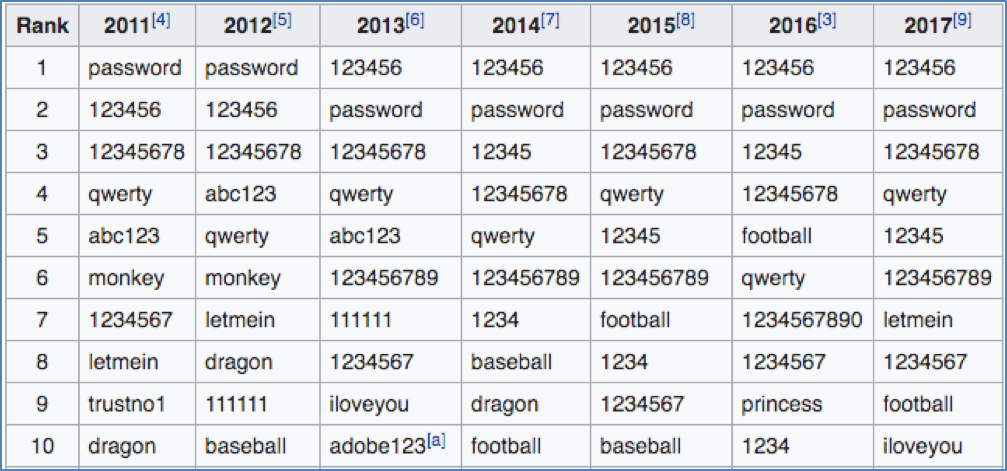
According to Wikipedia (https://en.wikipedia.org/wiki/List_of_the_most_common_passwords Accessed 7 June 2018), the most common passwords used in north America and Europe include:

Also common, is the substitution of letters with numbers or symbols:

  • Password could become P@ssw0rd, the @ replaces the letter ‘a’ and ‘0’ (zero) replaces the letter ‘o’

Using a common or simple password, it makes it easier for someone, or another automated system, to guess our password and gain access to our devices and our information.

Using a single password for multiple services

It is also easier to have a single password that we may use for many services. While this is convenient, it does expose the risk that if the password is discovered on one service, access to your other services is then exposed.

For example, if someone discovered your password for Instagram, they may attempt to use the same username (or email address) and the discovered password to get in to your Facebook and email account. This could lead to access to confidential information, your contacts database and more. We can refer to this as a ‘spill over’ risk.

DIM-05-02 Application Access Risks and Prevention

Operating systems (Windows, OSX, Android, and IOS) offer the opportunity for users to lock their device when it is inactive. This is a ‘soft-lock’ that prevents access when the device is powered on or inactive for a certain time period. By setting up your device to detect when you are inactive and automatically lock the device, you can prevent others from working on your device. To unlock access to the device, the person must enter an accepted username and authenticator(s).

Your username on the device may be displayed or known. You should control the security of your authenticator(s). If you use a password, make sure it is a strong password that nobody else knows or can guess. Some devices enable you to use your fingerprint as the authenticator. This is more secure than a password. Some devices use a pattern recognition system as opposed to a password. Choose an approach that you believe offers the best security.

If the applications and internet services you use offer their own security, this is a good option to prevent specific access should someone be able to access the device, or if the device was for some reason not locked.

Application access on shared devices

If a device is used by multiple users, the operating system may support user accounts. If each user has their own account, they can customise their workspace and ensure that their applications and internet services are separate from other user profiles. This is a good idea and offers more protection of your data. A system administrator can however access all user profiles, accounts and data. Ensure that the system administrator is a trusted party.

Internet browser specific risks

You use an internet browser to access application services on the internet. These services may give you the ability to access email, search for information, interact on social media etc.

When using an internet browser, your activity is recorded. There are a few ways in which this takes place:

  • The browser keeps track of all sites pages you visit. This is your browsing history.
  • The browser also attempts to learn about you and give you a customised service. By keeping track of your activities, areas of interest and habits, the information is used to predict what you may be interested in and to offer you content that may be related to your interested.
  • Internet browsers allow users to have their own personal profile. This allows users to organise internet services and content using tabs and bookmarks and to provide a structured way of using the internet. Having a personal profile that you login to, manage and customise, allows you have a common experience across multiple devices.
  • Internet browsers allows for website developers to install cookies, pieces of active code, that can monitor and record your activities, keystrokes, and some even offer to remember your usernames and passwords to make it easier for you.
  • Internet browsers may allow you to access the internet without updating the history file. This enables you to work ‘incognito’. Although locally the trail of activity won’t be logged, this does not mean that the services you access won’t be logging and keeping records on their own service platforms.


While all of the above motivations for keeping track of you are possibly well intentioned, there are a number of risks that arise.


  • Anyone using the browser after you can see what you have been doing by reviewing browsing history
  • If you have not logged out of your profile, all your settings, tabs, personal cookies etc., are open to be used by others and they can now access your services and the service providers will see it as you accessing the services.


When accessing application services over the internet, you receive information from, and you send information to the service application. This information can be transferred ‘in the clear’ or ‘encrypted’ depending on the service providers site security.

It is possible for your traffic to be monitored as it flows to and from the service providers site. If information is ‘in the clear’, anyone that can see the traffic flow can see exactly what is being transferred. This could include sensitive information.

When accessing high risk sites, where information is private and confidential, you should always make sure the site is transferring information securely. This can be done by checking the site’s address or URL (universal resource locator) that shows in your browser address bar. The site must indicate ‘https://…” as part of the address, or it must show a padlock symbol indicating data transfers are encrypted.

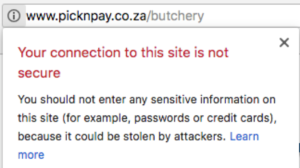
When accessing general internet sites, where you are simply consuming data in the public domain, security is not a major issue. The address of the site may indicate ‘http://…’ without the secure confirmation:

The browser may, as in the example above, give a warning indication that the site is not secure, and provide some guidance:

Internet browser risk Prevention

  • Always be aware if the site you are accessing using secure encryption (https://…)
  • Don’t do high risk transactions on public networks
  • Don’t do high risk transactions on shared devices
  • Also logout of any services you access before leaving a device
  • Clear out the history files and cache after browsing on a shared device
  • Don’t allow cookies to capture sensitive information (usernames and authenticators)

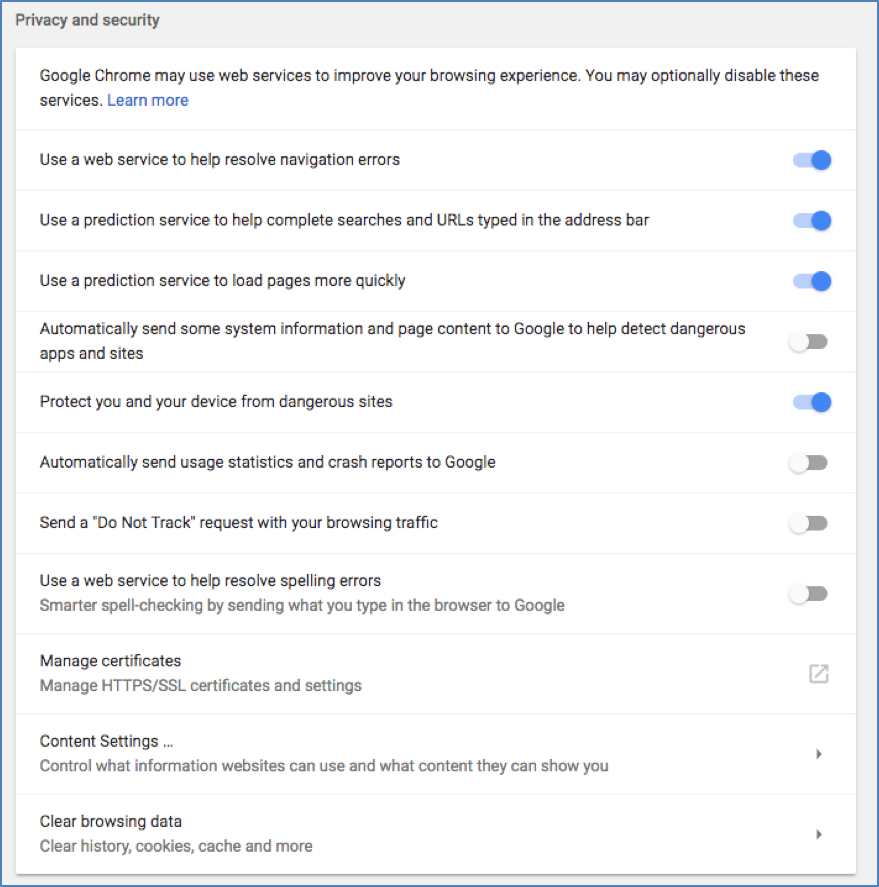
You have the ability to change your browser settings to mitigate risks:

Browser Settings to Mitigate Risks

DIM-05-01 Device Access Risks and Prevention

You use your device, smartphone, tablet, or computer to run applications and access internet services. These applications and internet services are working with your information and storing data. If you can access your applications and internet services, you can see your information and data.

How do you prevent someone else from accessing your device? There are a few points to consider:

  • If the device is not with you, is it locked up and safe from being physically accessed by others?
  • If the device is physically accessible to others, can others turn it on, and access your applications and data?
  • If the device you use is a shared device, are the applications you use and the data you work with accessible to others when they use the device?
  • Do the applications and internet services you use have their own security?

Physical device access

Physical security of a device is important. Devices, mobile devices in particular, can easily be lost or stolen. You need to ensure that if your device is stolen, access to your applications and internet services, as well as all your data is protected.

Device risk Prevention

  • Physically secure devices when not in your possession
  • Use ‘soft-lock’ features to secure your device when turned on, or inactive
  • Use application specific security features where available
  • Use operating system user accounts or profiles or shared devices