DIM-10-01 Password Risks
Password risks
We have and use passwords to prevent others from accessing our devices and information. How do we approach using passwords? How can we be sure that our password is secure enough to achieve our objective of protecting information and other resources?
Let us first consider how we initially get our passwords:
- Services require the use of a username and authenticators. It is common for an email address to be the username for many services. Our email addresses are in the public domain and offer no security in their own right if used as a username. The security is determined by the authenticators, not he username.
- Earlier we talked about enrolling for a service, and once enrolled we receive an acceptable username and authenticator(s). Passwords are perhaps the most common form of authenticator. Our initial password may be given to us by the service provider. Once we have our credentials (username and authenticator(s)), it is our job to maintain our authenticator(s) and ensure that they are suitably secure.
- When setting up a device for the first time, we set up our own device access credentials. We need to maintain our password and ensure it is secure.
Rules for passwords
The passwords we use will, in many cases, depend on the expectations of the service provider. Service providers can set the rules in terms of:
- Minimum length of password (the longer, the more secure, ideally 8 or more characters)
- Requirement for combination of alphabetic characters and numbers (eg. abc123)
- Requirement for mixed case (eg. abCde…)
- Requirement for inclusion of symbols (eg. abc123#)
- How often passwords must be changed
- Whether passwords can be reused
Simple, and common passwords
Remembering passwords for many different services is not easy. It is often tempting to use simple and perhaps common passwords.
According to Wikipedia (https://en.wikipedia.org/wiki/List_of_the_most_common_passwords Accessed 7 June 2018), the most common passwords used in north America and Europe include:
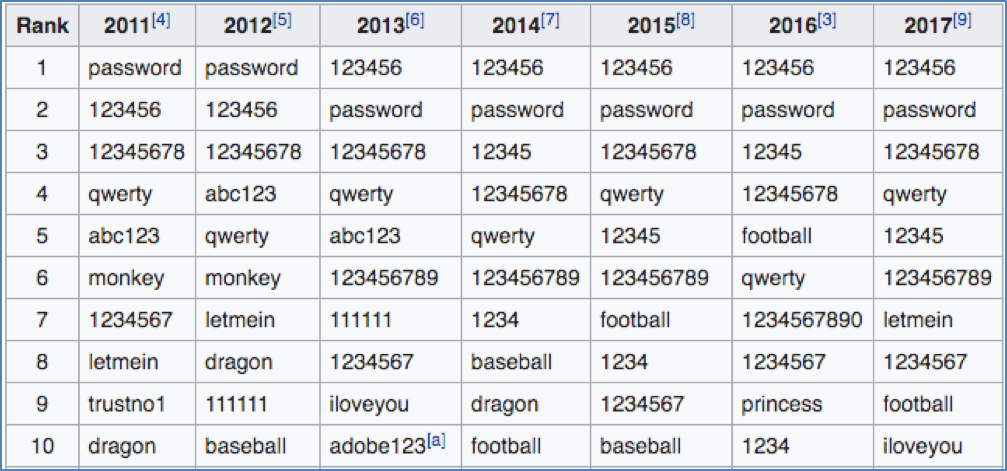
Also common, is the substitution of letters with numbers or symbols:
- Password could become P@ssw0rd, the @ replaces the letter ‘a’ and ‘0’ (zero) replaces the letter ‘o’
Using a common or simple password, it makes it easier for someone, or another automated system, to guess our password and gain access to our devices and our information.
Using a single password for multiple services
It is also easier to have a single password that we may use for many services. While this is convenient, it does expose the risk that if the password is discovered on one service, access to your other services is then exposed.
For example, if someone discovered your password for Instagram, they may attempt to use the same username (or email address) and the discovered password to get in to your Facebook and email account. This could lead to access to confidential information, your contacts database and more. We can refer to this as a ‘spill over’ risk.