ML-03-07 Sharing Information with Others
We need to share and exchange information, documents and photos with other. Fortunately, operating system developers have catered for the exchange of data between applications. Obviously the two applications must be able to send and receive data in the same format.
When in an application you may see the following icon that represents the share function:

Examples of this functionality being required may include:
- Using WhatsApp or Email to share a photograph
- Sending a scanned document via Email
- Moving files from local storage to online file stores
- Uploading videos from local gallery to YouTube
Some target applications may be:
- Notes Application
- Online file stores (Google Drive, Dropbox etc.)
- Skype (share during a Skype conference call)
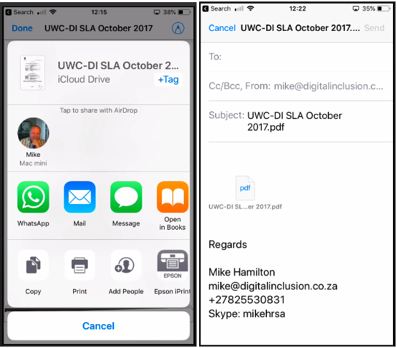
In the example above, the “Share” function has been selected from a scanning application. By selecting share using email, the email application opens, prepares the scanned document PDF for sending, and waits on the user to enter the email address of the person the document is to be sent to.
When using the “Share” function, the operating system will present the user with a selection of applications that the content can be shared with. This includes messaging and other applications, as well as the ability to copy, print the content.
Once you choose the target application, it will opened on your device, the content will be attached and you will guided through providing necessary information complete the sharing.